How to Use Samsung SmartThings to Automate Your Home

Smart homes are no longer a futuristic dream, they’re already here with us. From controlling lights with a tap on your phone to receiving notifications when someone rings your doorbell, automation is becoming a part of everyday life. At the center of this transformation is Samsung SmartThings, a platform that connects all your smart devices into one ecosystem.
If you’ve been curious about how to use Samsung SmartThings to automate your home, this guide will walk you through everything you need to know. We’ll cover what SmartThings is, how it works, and the best ways to use it to simplify your daily routines.
What is Samsung SmartThings?
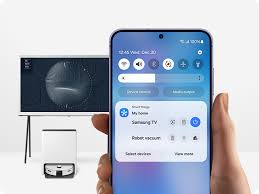
Samsung SmartThings is a smart home hub and app that acts as the brain of your connected devices. Instead of managing your smart lights, plugs, locks, and appliances separately through different apps, SmartThings brings them together under one roof.
By learning how to use Samsung SmartThings to automate your home, you gain the ability to set custom routines, control multiple devices at once, and even integrate voice assistants like Alexa and Google Assistant.
Why Automate Your Home with SmartThings?
Before diving into the steps, it’s important to understand why SmartThings is such a game-changer.
Convenience: Imagine saying “Goodnight” to Alexa or tapping a button in the SmartThings app, and instantly your lights turn off, doors lock, and thermostat adjusts.
Energy Efficiency: Automations like turning off unused lights or adjusting your AC when you’re away save both money and energy.
Security: Get alerts if a window is opened, set your camera to activate when motion is detected, or lock doors remotely.
Customization: Whether you want simple controls or complex routines, SmartThings adapts to your lifestyle.
This is why knowing how to use Samsung SmartThings to automate your home gives you more than convenience—it brings peace of mind.
Getting Started with SmartThings
Step 1: Download the App
The SmartThings app is available on both iOS and Android. Once downloaded, you’ll create or sign in with your Samsung account.
Step 2: Connect Your Devices
SmartThings supports a wide range of devices, from Samsung appliances to third-party gadgets like Philips Hue, Ring, Arlo, and more. Use the app to search and connect your devices, and they’ll appear in your dashboard.
Step 3: Create Rooms and Groups
To make control easier, group devices by room. For example, you can place all living room devices—TV, lights, plugs—under one category.
Step 4: Build Automations
This is where the magic happens. By learning how to use Samsung SmartThings to automate your home, you can set rules and routines, like:
Turn off all lights at midnight.
Start the coffee maker when you turn off your morning alarm.
Lock the doors automatically when you leave the house.
Popular Automations with SmartThings
Lighting Control
Want your lights to dim automatically when it’s bedtime? Or turn on when motion is detected at night? SmartThings makes this effortless.
Climate and Energy Management
You can connect smart thermostats and plugs to reduce power consumption. For example, your AC can switch off when no one is home.
Home Security
Door sensors, cameras, and locks work together to keep your home safe. You’ll receive instant alerts if anything unusual happens.
Appliance Integration
Samsung’s own smart refrigerators, washing machines, and ovens connect seamlessly to SmartThings, allowing you to monitor or control them remotely.
Each of these features shows why learning how to use Samsung SmartThings to automate your home isn’t just about convenience—it’s about creating a smarter lifestyle.
Tips for Maximizing SmartThings
Start Small: Don’t try to automate everything at once. Begin with a few routines, like lights or door locks.
Use Voice Control: Integrate Alexa or Google Assistant for hands-free operation.
Leverage Sensors: Motion, temperature, and contact sensors make automations more powerful.
Experiment: The more you explore, the more you’ll discover creative ways to streamline your day.
Conclusion
Knowing how to use Samsung SmartThings to automate your home is one of the easiest ways to step into the world of smart living. From basic lighting setups to advanced routines that manage multiple devices, SmartThings offers flexibility, simplicity, and peace of mind.
Start with a few devices, build routines that suit your lifestyle, and watch as your home becomes more connected and intelligent. Automation isn’t just about technology, it’s also about making life smoother, safer, and smarter.
When you purchase through links on our site, we may earn an affiliate commission which helps in keeping this website running. Here’s how it works.
Use the Code ref-09ngex to get 5% off from Samsung

About the Author: Ikhide Uanseoje
Welcome to SamUniverse! My name is Ikhide Uanseoje, the mind behind this website dedicated to everything Samsung. As a passionate tech enthusiast and lover, I specialize in delivering the latest news, in-depth reviews, and helpful guides about Samsung products, from smartphones and wearables to laptops and accessories.
Born and raised in Nigeria, I’ve always had a fascination with cutting-edge technology and how it shapes our lives. This passion led me to create SamUniverse, a platform where Samsung fans and tech lovers can explore innovations, tips, and updates that truly matter.
When I’m not writing, you’ll find me exploring new tech trends, brainstorming ideas for future posts, or working on ways to make this website your go-to resource for all things Samsung.
Stay tuned to SamUniverse as we uncover the best Samsung has to offer!